
CloudFlare Turnstile Recaptcha For Magento2 Hyva Theme
- Seller lutish
- Creation date
The best performing lazy loading captcha For Your Hyva Theme


Overview Discussion
# Cloudflare Turnstile for Magento 2
A seamless, drop-in integration that adds **Cloudflare Turnstile** bot protection to your Magento 2 store. Built on Magento's native reCAPTCHA framework, this extension replaces Google reCAPTCHA with Turnstile across every form in your storefront and admin panel — with zero friction for real customers.
---
## Why Cloudflare Turnstile?
Turnstile is Cloudflare's privacy-first CAPTCHA alternative. Unlike traditional CAPTCHAs, it **never interrupts real users** with image puzzles or checkbox challenges. Most visitors pass without even seeing it, which means higher conversion rates and fewer abandoned carts.
- **No user interaction required** for the vast majority of visitors
- **Privacy-focused** — no tracking, no data collection beyond what's needed to verify
- **Free** — unlimited verifications, no pricing tiers
- **Fully GDPR-compliant** — no personal data stored or shared
---
## Where Turnstile Protects Your Store
### Storefront Forms (13+ touchpoints)
| Form / Page | What It Protects |
|-------------|-----------------|
| **Customer Login** | Brute-force login attempts and credential stuffing |
| **Customer Registration** | Fake account creation and spam sign-ups |
| **Forgot Password** | Abuse of password reset functionality |
| **Edit Account** | Unauthorized account profile changes |
| **Checkout / Place Order** | Carding attacks and automated order fraud |
| **Contact Us** | Contact form spam |
| **Newsletter Subscription** | Fake newsletter sign-ups and list poisoning |
| **Footer Newsletter** | Same as above — separately configurable per footer placement |
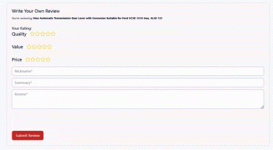
| **Product Reviews** | Fake product reviews and review spam |
| **Send to Friend** | Spam sent through "Email a Friend" feature |
| **Wishlist Sharing** | Spam via wishlist sharing emails |
| **Gift Card** | Gift card balance enumeration |
| **Coupon Code on Cart** | Automated coupon brute-forcing |
| **Invitation Create Account** | Spam through invitation-based registration |
| **PayPal Payflow Pro** | Fraud during PayPal checkout |
| **Resend Confirmation Email** | Abuse of confirmation email resend |
### Admin Panel
| Form | What It Protects |
|------|-----------------|
| **Admin Login** | Brute-force attacks on admin accounts |
| **Admin Forgot Password** | Password reset abuse targeting admin users |
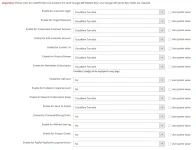
Every form listed above can be **enabled or disabled individually** from the Magento admin panel — you decide exactly which touchpoints need protection.
---
## Key Features
### Smart, Invisible Verification
Turnstile runs silently in the background. If a visitor is recognized as human, the verification completes automatically. Only in rare ambiguous cases is a simple checkbox challenge shown. Compare that to reCAPTCHA v2's mandatory image puzzles or v3's invisible-but-intrusive scoring system.
### Individual Form Control
Turnstile protection is managed through the same intuitive configuration interface as Google reCAPTCHA. Enable or disable it per form — keep protection on high-risk areas like login and registration, and optionally skip it on lower-risk pages. Every form has its own on/off toggle.
### Separate Storefront & Admin Credentials
Your frontend and admin panel use independent Turnstile site keys and secret keys. This means you can use different Cloudflare accounts, different security policies, or even different CAPTCHA providers for customer-facing pages versus the admin backend.
### Widget Customization
Configure the Turnstile widget appearance to match your store's design:
| Option | Choices |
|--------|---------|
| **Size** | Normal (full-width) · Compact (smaller) · Flexible (adapts to container) |
| **Theme** | Light · Dark |
| **Language** | Auto-detect (default) · Manual language code override |
| **Error Message** | Customize the text shown when verification fails |
### Performance-Optimized Loading
The Turnstile script is loaded **only when needed** — it defers loading until a visitor actually interacts with a protected form (clicks or focuses into a field). This keeps your initial page load fast and your Core Web Vitals scores high.
On Hyva-themed stores, the extension goes further: widget containers reserve fixed dimensions before the script loads to **eliminate Cumulative Layout Shift (CLS)** entirely. Visitors never see the page jump as the widget appears.
### Full Hyva Theme Support
First-class Hyva compatibility with Alpine.js-powered templates. The extension includes dedicated Hyva form validation that:
- Checks for a valid Turnstile token before form submission
- Automatically refreshes tokens when they expire
- Shows inline error messages if verification hasn't completed
- Integrates cleanly with Hyva's default form submission flow (contact form, login, registration, reviews, and more)
### Luma & Knockout.js Support
Full compatibility with the default Magento Luma theme and Knockout.js-based checkout. Turnstile is rendered using Magento's standard UI component architecture, ensuring it works in:
- Default checkout (shipping step, billing step, place order)
- Authentication popups during checkout
- All standard Magento form blocks
### Mageplaza OneStepCheckout Integration
Dedicated support for Mageplaza's popular OneStepCheckout extension. Turnstile protection is injected directly into the OSC place-order flow, with the native reCAPTCHA checkout component automatically disabled to prevent conflicts.
### GraphQL & Headless Ready
Turnstile tokens are validated through Magento's GraphQL API layer, making this extension fully compatible with headless storefronts, PWA Studio, and any third-party frontend that communicates via GraphQL. The token is passed through the standard `X-ReCaptcha` header.
### CSP Compliant
Cloudflare's `challenges.cloudflare.com` domain is automatically whitelisted in your store's Content Security Policy — no manual CSP configuration needed.
---
## How It Works (The Short Version)
1. **Install** the extension via Composer
2. **Get your keys** from the [Cloudflare Turnstile dashboard](https://dash.cloudflare.com/?to=/:account/turnstile) (free, takes 30 seconds)
3. **Enter your keys** in `Stores > Configuration > Security > Google reCAPTCHA Storefront` under the "Cloudflare Turnstile" section
4. **Choose which forms** to enable Turnstile on — each form has its own toggle
5. **Done.** Turnstile now protects your store.
There's nothing else to configure. No theme modifications, no code changes, no layout XML overrides. It works out of the box with both Luma and Hyva themes.
---
## Requirements
| Requirement | Details |
|-------------|---------|
| **Magento** | Adobe Commerce / Magento Open Source 2.4.x |
| **PHP** | 8.1, 8.2, or 8.3 8.4 8.5 |
| **Cloudflare** | A free Cloudflare account for Turnstile site keys |
| **Magento reCAPTCHA modules** | `Magento_ReCaptchaUi`, `Magento_ReCaptchaFrontendUi`, `Magento_ReCaptchaAdminUi` (bundled with Magento core) |
---
---
## Configuration Quick Reference
Navigate to **Stores > Configuration > Security** in your Magento admin:
### Storefront Settings
`Google reCAPTCHA Storefront > Cloudflare Turnstile`
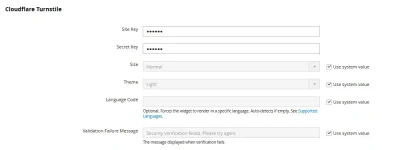
- **Site Key** — Your Turnstile site key
- **Secret Key** — Your Turnstile secret key
- **Size** — Widget display size (Normal / Compact / Flexible)
- **Theme** — Widget color theme (Light / Dark)
- **Language Code** — Force a specific language, or leave blank for auto-detection
- **Validation Failure Message** — The error text visitors see when verification fails
Then scroll down to enable Turnstile on individual forms under the **Storefront** section.
### Admin Panel Settings
`Google reCAPTCHA Admin Panel > Cloudflare Turnstile`
Same configuration fields, applied independently to the admin login and forgot password forms.
---
A seamless, drop-in integration that adds **Cloudflare Turnstile** bot protection to your Magento 2 store. Built on Magento's native reCAPTCHA framework, this extension replaces Google reCAPTCHA with Turnstile across every form in your storefront and admin panel — with zero friction for real customers.
---
## Why Cloudflare Turnstile?
Turnstile is Cloudflare's privacy-first CAPTCHA alternative. Unlike traditional CAPTCHAs, it **never interrupts real users** with image puzzles or checkbox challenges. Most visitors pass without even seeing it, which means higher conversion rates and fewer abandoned carts.
- **No user interaction required** for the vast majority of visitors
- **Privacy-focused** — no tracking, no data collection beyond what's needed to verify
- **Free** — unlimited verifications, no pricing tiers
- **Fully GDPR-compliant** — no personal data stored or shared
---
## Where Turnstile Protects Your Store
### Storefront Forms (13+ touchpoints)
| Form / Page | What It Protects |
|-------------|-----------------|
| **Customer Login** | Brute-force login attempts and credential stuffing |
| **Customer Registration** | Fake account creation and spam sign-ups |
| **Forgot Password** | Abuse of password reset functionality |
| **Edit Account** | Unauthorized account profile changes |
| **Checkout / Place Order** | Carding attacks and automated order fraud |
| **Contact Us** | Contact form spam |
| **Newsletter Subscription** | Fake newsletter sign-ups and list poisoning |
| **Footer Newsletter** | Same as above — separately configurable per footer placement |
| **Product Reviews** | Fake product reviews and review spam |
| **Send to Friend** | Spam sent through "Email a Friend" feature |
| **Wishlist Sharing** | Spam via wishlist sharing emails |
| **Gift Card** | Gift card balance enumeration |
| **Coupon Code on Cart** | Automated coupon brute-forcing |
| **Invitation Create Account** | Spam through invitation-based registration |
| **PayPal Payflow Pro** | Fraud during PayPal checkout |
| **Resend Confirmation Email** | Abuse of confirmation email resend |
### Admin Panel
| Form | What It Protects |
|------|-----------------|
| **Admin Login** | Brute-force attacks on admin accounts |
| **Admin Forgot Password** | Password reset abuse targeting admin users |
Every form listed above can be **enabled or disabled individually** from the Magento admin panel — you decide exactly which touchpoints need protection.
---
## Key Features
### Smart, Invisible Verification
Turnstile runs silently in the background. If a visitor is recognized as human, the verification completes automatically. Only in rare ambiguous cases is a simple checkbox challenge shown. Compare that to reCAPTCHA v2's mandatory image puzzles or v3's invisible-but-intrusive scoring system.
### Individual Form Control
Turnstile protection is managed through the same intuitive configuration interface as Google reCAPTCHA. Enable or disable it per form — keep protection on high-risk areas like login and registration, and optionally skip it on lower-risk pages. Every form has its own on/off toggle.
### Separate Storefront & Admin Credentials
Your frontend and admin panel use independent Turnstile site keys and secret keys. This means you can use different Cloudflare accounts, different security policies, or even different CAPTCHA providers for customer-facing pages versus the admin backend.
### Widget Customization
Configure the Turnstile widget appearance to match your store's design:
| Option | Choices |
|--------|---------|
| **Size** | Normal (full-width) · Compact (smaller) · Flexible (adapts to container) |
| **Theme** | Light · Dark |
| **Language** | Auto-detect (default) · Manual language code override |
| **Error Message** | Customize the text shown when verification fails |
### Performance-Optimized Loading
The Turnstile script is loaded **only when needed** — it defers loading until a visitor actually interacts with a protected form (clicks or focuses into a field). This keeps your initial page load fast and your Core Web Vitals scores high.
On Hyva-themed stores, the extension goes further: widget containers reserve fixed dimensions before the script loads to **eliminate Cumulative Layout Shift (CLS)** entirely. Visitors never see the page jump as the widget appears.
### Full Hyva Theme Support
First-class Hyva compatibility with Alpine.js-powered templates. The extension includes dedicated Hyva form validation that:
- Checks for a valid Turnstile token before form submission
- Automatically refreshes tokens when they expire
- Shows inline error messages if verification hasn't completed
- Integrates cleanly with Hyva's default form submission flow (contact form, login, registration, reviews, and more)
### Luma & Knockout.js Support
Full compatibility with the default Magento Luma theme and Knockout.js-based checkout. Turnstile is rendered using Magento's standard UI component architecture, ensuring it works in:
- Default checkout (shipping step, billing step, place order)
- Authentication popups during checkout
- All standard Magento form blocks
### Mageplaza OneStepCheckout Integration
Dedicated support for Mageplaza's popular OneStepCheckout extension. Turnstile protection is injected directly into the OSC place-order flow, with the native reCAPTCHA checkout component automatically disabled to prevent conflicts.
### GraphQL & Headless Ready
Turnstile tokens are validated through Magento's GraphQL API layer, making this extension fully compatible with headless storefronts, PWA Studio, and any third-party frontend that communicates via GraphQL. The token is passed through the standard `X-ReCaptcha` header.
### CSP Compliant
Cloudflare's `challenges.cloudflare.com` domain is automatically whitelisted in your store's Content Security Policy — no manual CSP configuration needed.
---
## How It Works (The Short Version)
1. **Install** the extension via Composer
2. **Get your keys** from the [Cloudflare Turnstile dashboard](https://dash.cloudflare.com/?to=/:account/turnstile) (free, takes 30 seconds)
3. **Enter your keys** in `Stores > Configuration > Security > Google reCAPTCHA Storefront` under the "Cloudflare Turnstile" section
4. **Choose which forms** to enable Turnstile on — each form has its own toggle
5. **Done.** Turnstile now protects your store.
There's nothing else to configure. No theme modifications, no code changes, no layout XML overrides. It works out of the box with both Luma and Hyva themes.
---
## Requirements
| Requirement | Details |
|-------------|---------|
| **Magento** | Adobe Commerce / Magento Open Source 2.4.x |
| **PHP** | 8.1, 8.2, or 8.3 8.4 8.5 |
| **Cloudflare** | A free Cloudflare account for Turnstile site keys |
| **Magento reCAPTCHA modules** | `Magento_ReCaptchaUi`, `Magento_ReCaptchaFrontendUi`, `Magento_ReCaptchaAdminUi` (bundled with Magento core) |
---
---
## Configuration Quick Reference
Navigate to **Stores > Configuration > Security** in your Magento admin:
### Storefront Settings
`Google reCAPTCHA Storefront > Cloudflare Turnstile`
- **Site Key** — Your Turnstile site key
- **Secret Key** — Your Turnstile secret key
- **Size** — Widget display size (Normal / Compact / Flexible)
- **Theme** — Widget color theme (Light / Dark)
- **Language Code** — Force a specific language, or leave blank for auto-detection
- **Validation Failure Message** — The error text visitors see when verification fails
Then scroll down to enable Turnstile on individual forms under the **Storefront** section.
### Admin Panel Settings
`Google reCAPTCHA Admin Panel > Cloudflare Turnstile`
Same configuration fields, applied independently to the admin login and forgot password forms.
---